TABLE OF CONTENTS
Summary
It's important that you understand how to read & interpret a tenancy ledger so you can identify rent/invoice arrears & payment details such as when a payment was received & what it has been receipted to.
Every tenancy has a tenancy ledger showing a complete history of all payments received for the tenancy - this includes rent, bond & invoice payments.
Reading the Tenant Ledger
Most tenant ledgers will be broken down into columns & rows. A row across will typically be a transaction for the tenancy & the columns will provide information relating to that transaction. The below definitions list may differ slightly from how tenant ledgers are displayed from other systems.
Definition of each Column on the Ledger
Received: The date the payment was received to the trust account
Entered: The date the payment was receipted to the tenancy
User: The system user that receipted the payment
#: Transaction Number in the system being used
Method: Payment method used by the payer
Type: The type is the transaction type - for rent payments, the transaction type will typically be 'Receipt'. Other transaction types include but aren't limited to 'Invoice', 'Allocation', 'Rent Adjustment', 'Refund' etc.
Period From - To: The period of rent being paid from the transaction as per the rent schedule. This period is typically a week (e.g. 01/01/2026 - 07/01/2026), however, it can be monthly dates depending on how rent is paid as per the tenancy agreement. This period from - to date will only be updated if a full week's rent payment covers the dates shown.
Part Payment: The part payment column shows if there is an amount of rent paid that does not equal to a full weeks rent. The part payment shown in this column has still been receipted to rent. This part payment may result in the rent being paid past the date being shown in the 'Period From - To' column. If there is a part payment, the true effective rent paid to date is shown in the next 'Description' column.
Description: The description column will often be the quickest way to identify the purpose of a transaction. For rent transactions, this column will state the true, effective rent paid to date that considers any receipted part payments. This column also shows the purpose of invoices, refunds, rent adjustments etc.
Rent: The weekly, fortnightly or monthly rent amount that is payable by the tenant
Payer/Payee: For credit transactions, this column shows who made the payment. For rent payments, this column will always state the tenancy name as the payer. For debit transactions, this column shows who the amount was paid to.
Debit: A debit transaction is money being paid out from the tenancy funds to a third party account that is not the ownership account. A refund is the most common type of debit transaction & the rent is often to either the tenant or new managing agent when required.
Credit: A credit transaction is money being paid into the tenancy account, all payments received for bond, rent & invoice payments will show as credits on the tenant ledger.
Balance: The balance will state the total amount of money that has been received throughout the tenancy & paid to the owner account. The balance amount will decrease if money is refunded from the tenancy account.
Identifying Rent Arrears on a Ledger
To identify rent arrears, there are three key columns you will need to refer to: 'Received', 'Period From - To' & 'Description'
Received: The date the payment was received to the trust account
Period From - To: The period of rent being paid from the transaction as per the rent schedule. This period is typically a week (e.g. 01/01/2026 - 07/01/2026), however, it can be monthly dates depending on how rent is paid as per the tenancy agreement. This period from - to date will only be updated if a full week's rent payment covers the dates shown.
Description: The description column will often be the quickest way to identify the purpose of a transaction. For rent transactions, this column will state the true, effective rent paid to date that considers any receipted part payments.
The quickest way to identify rent arrears is to check the rent effective paid to date in the 'Description' column. This may differ from the 'Period From - To' column if there is a part payment so it is important you refer to the effective rent paid to date only.
Once you have found the effective rent paid to date, you will then check the 'Received' column in the next transaction one row down. This will tell you when the rent was paid to & when a payment was next received.
Example of Arrears on a Ledger
Please see an example below (some information has been redacted for privacy reasons):

In the above example, you can see (highlighted in yellow) the rent was effective paid to 27/03/2026. The next rent payment was not made until 01/04/2026, 5 days after the rent was due. This means they were 5 days in arrears by the time they made a payment on 01/04/2026.
Similarly, (highlighted in blue) you can see the rent was effective paid to 30/03/2026 but the next rent payment wasn't made until 07/04/2026, 8 days after the rent was due.
How to access a tenant ledger when using HO Rentals Support Service
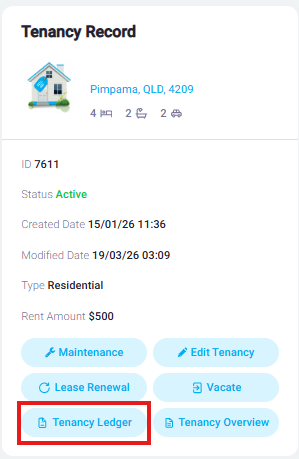
If you need to access a tenant ledger, please navigate to the tenancy record in the Cloud & click the 'Tenancy Ledger' button on the left hand side of the screen.
Was this article helpful?
That’s Great!
Thank you for your feedback
Sorry! We couldn't be helpful
Thank you for your feedback
Feedback sent
We appreciate your effort and will try to fix the article