TABLE OF CONTENTS
- How to complete an exit condition report
- Tenant Vacate Procedure
- Managing a Bond after the Vacate Inspection
- How to schedule your Vacate Inspection
The Exit condition report shows the condition of the property and any inclusions when the tenant leaves, and is an important part of the vacating and bond refund process. The Exit condition report is compared to the Entry condition report to determine if the property is in the same condition as when the tenant moved in, apart from fair wear and tear.
You should take sufficient photos & note any required cleaning, damages, items to be removed etc. This report must be completed within a certain timeframe, only after the tenant provides vacant possession of the property.
How to complete an exit condition report
Ideally, the tenant and property manager/owner should complete the report together so that any issues can be addressed quickly and the bond refund can be released as soon as possible.
To prevent disputes, it's recommended that both parties ensure the meter reading is recorded in both entry and exit condition reports at the beginning and end of the tenancy.
However, if the tenant/s and the property manager/owner complete the report separately, they should follow this process:
- The tenant removes their items and completes a thorough clean of the property.
- The tenant completes an Exit condition report and submits it to the property manager/owner when returning the keys.
- The property manager/owner reviews the tenant’s notes at the vacate inspection, makes any additional comments and signs.
- The property manager/owner sends a completed copy of the report to the tenant at their new address within three business days.
- Either the tenant or the property manager/owner submits a bond refund request.
Bond claims must be supported by evidence, so take dated photos and note all cleaning, damage and items to be removed in the exit condition report. Evidence rules differ by state:
- Queensland: supporting evidence must be given to the tenant/resident within 14 days of making a bond claim or disputing a refund. Not doing so is an offence.
- Victoria (from 13 October 2026): every renter must be given advance notice of the claim and the supporting evidence (invoices, receipts, quotes or photos) before the claim is lodged with the RTBA. Evidence must not contradict the condition reports.
- New South Wales: if you lodge a claim about the condition of the premises without the tenant's signature, the final condition report and quotes/invoices must be sent to the tenant within 7 days.
For full details by state, please refer to the Bond Refund Process article.
It is the tenant’s responsibility is to return the rental property in the same condition it was in at the start of the tenancy, less fair wear and tear. The RTA encourages parties to talk with each other if there are any issues with the vacate inspection and work together for a solution if there is any cleaning or damage items to be rectified.
The property manager/owner must keep a copy of the signed report for at least one year after the tenancy ends.
Tenant Vacate Procedure
For more information on the vacate procedure, please refer to the following article:
https://www.atrealtysupport.com.au/support/solutions/articles/14000146311-tenant-vacate-procedure
Managing a Bond after the Vacate Inspection
For information on bond refunds, please refer to the following article:
https://www.atrealtysupport.com.au/support/solutions/articles/14000164715-bond-refund-process
How to schedule your Vacate Inspection
To schedule your vacate inspection in Inspection Manager, you will need to access the @realty Cloud. You will only be scheduling inspections through the Cloud, not creating them in the Inspection Manager platform.
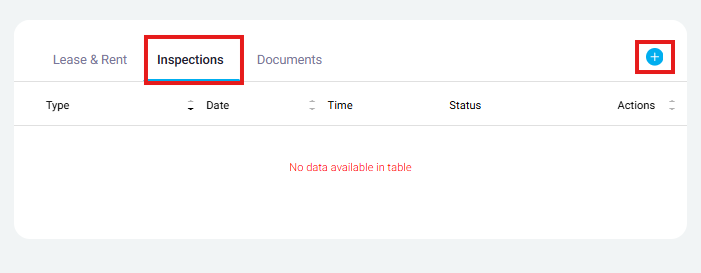
Visit the Tenancy Record > Click 'Inspections' near the middle of the screen > Click the '+' in the top right corner of the box (pictured below)
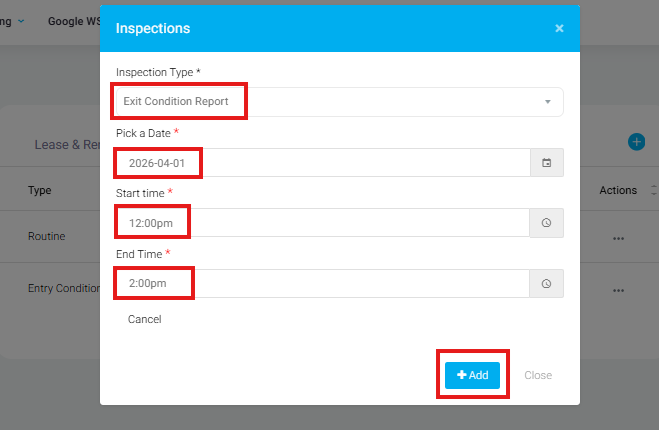
Once it opens the below pop up window, fill in the inspection information > Once complete, click 'Add'
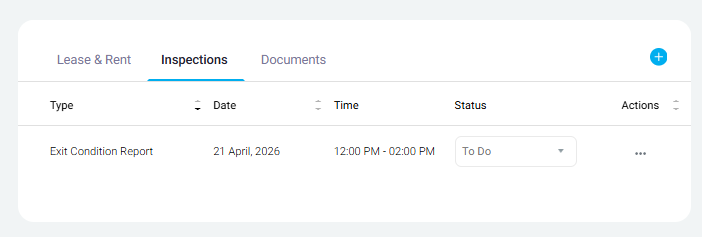
Once added, the inspection will now be visible in the Tenancy Record page. This will take up to 24 hours to become visible in your Inspection Manager. If you need to access the inspection sooner, please contact Head Office Rentals team via email or phone call.
Was this article helpful?
That’s Great!
Thank you for your feedback
Sorry! We couldn't be helpful
Thank you for your feedback
Feedback sent
We appreciate your effort and will try to fix the article