If you manage rental properties within @realty's Head Office PM Support Service, you will be able to access Property Tree reports relating to your managements & tenancies. Instead of needing to log in to a separate Property Tree portal, you can access the documents directly through the Tenancy Record in the @realty Cloud.
PLEASE NOTE: If the management or tenancy record is not yet created in Property Tree, this feature will not be available yet for that property.
TABLE OF CONTENTS
Summary of Available Reports
Tenancy
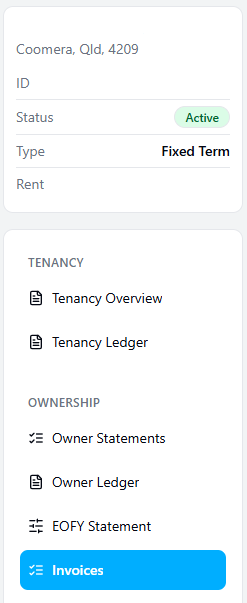
Tenancy Overview:
The Tenancy Overview provides you with a comprehensive summary, providing you with a full picture of the tenancy. The overview includes lease and rent information, rent position (paid to date/arrears), invoices & invoice arrears, ownership balance & bond information.
Tenancy Ledger:
The tenancy ledger will be generated with up to date information from Property Tree.
For assistance with reading a ledger, please refer to the following Support article:
https://www.atrealtysupport.com.au/support/solutions/articles/14000164626-reading-a-tenant-ledger
Ownership
Ownership Statements:
You can access a full list of all statements generated for the Ownership. You can filter by accounting period or search for the statement number.
Owner Ledger:
The owner ledger will be generated with up to date information from Property Tree.
EOFY Statement:
You can access EOFY statements that have been generated in the past. All previous EOFY statements are accessible.
Invoices:
You can access a full list of invoices that have been paid through the ownership. You can also access invoices that are yet to be paid.
Accessing the Reports
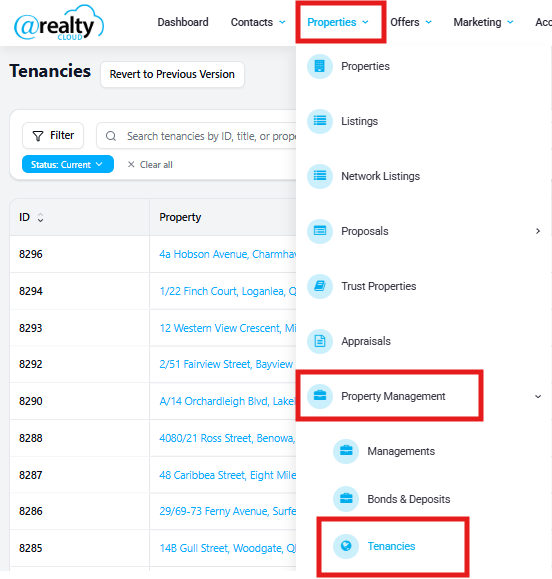
To access the reports, please navigate to the Tenancies page in the Cloud & select one of the tenancies to open the Tenancy Record.
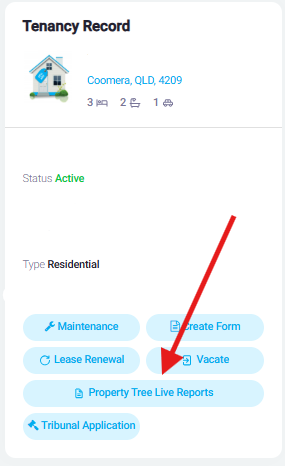
From the tenancy record, select 'Property Tree Live Reports' on the left hand side of the page:
Once you open the Property Tree Live Reports, you can choose your report type on the left hand side of the screen:
Was this article helpful?
That’s Great!
Thank you for your feedback
Sorry! We couldn't be helpful
Thank you for your feedback
Feedback sent
We appreciate your effort and will try to fix the article