TABLE OF CONTENTS
This article will briefly explain the different systems & applications you will be accessing when managing rentals with @realty HO support service.
@realty Cloud
The CRM (Cloud) is your primary source of information.
This is where you will enter and update data throughout your Property Management experience.
As you create and update management and tenancy records, notifications are automatically sent to the PM Support Team so they can efficiently action the necessary tasks.
Please see below articles relating to using the Cloud for Property Management tasks:
How to Create a Property Record
https://www.atrealtysupport.com.au/support/solutions/articles/14000088786-creating-a-property
How to Create a Management Record
https://www.atrealtysupport.com.au/support/solutions/articles/14000148410-how-to-create-a-management-record
How to create a For Lease Listing
Using @realty Cloud to process rental applications
How to Create a Tenancy Record
Property Tree
Property Tree is the Property Management System that the HO Rentals Team uses to record information & manage trust accounting. HO Rentals will create records in Property Tree based on the information you (as the agent) enter into the Cloud.
You will have access to the Owners & Tenants portals, meaning you will be able to see the same information they do.
What to access in the PT Owner & Tenant Portals
- Live data for income and expenditure
- Ownership ledgers
- Arrears information
PLEASE NOTE: Once you have your 1st property to manage, you will receive an invite to Property Tree, not before.
https://client.propertytree.com/login
Inspection Manager
This is the primary tool used to conduct your Ingoing, Outgoing and Routine Inspections.
For inspections to be scheduled in Inspection Manager, you must create the inspection in the tenancy record in the Cloud.
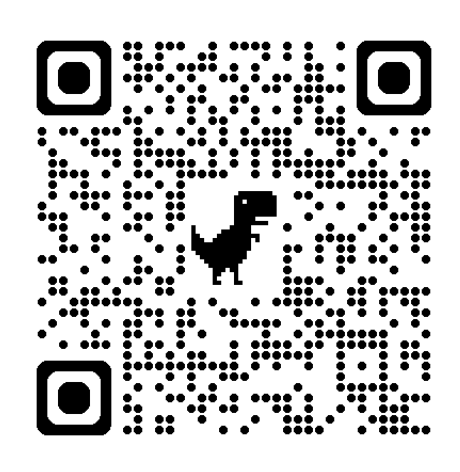
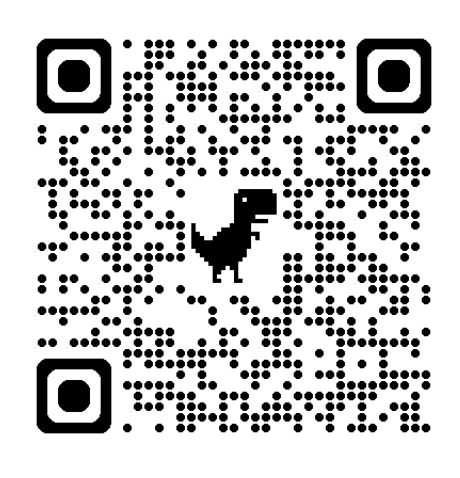
QR codes for downloading the Prop Tech Labs (Inspection Manager) app:
Android
IOS / Apple
Equifax
Equifax is a database you can conduct tenant history checks through.
While it’s good to have this resource, the best way to check the quality of tenants is always through assessing the entire application including all reference checks.
Equifax or any other tenant database should not be your primary tenant checking method.
For more information on Equifax, please refer to the following article:
https://www.atrealtysupport.com.au/support/solutions/articles/14000146973-equifax
REA Forms
You will use REA Forms to generate management & tenancy agreements & send them for electronic signing. REA forms has template forms you can use by clicking 'Subscription Forms' within REA Forms.
How to access REA forms
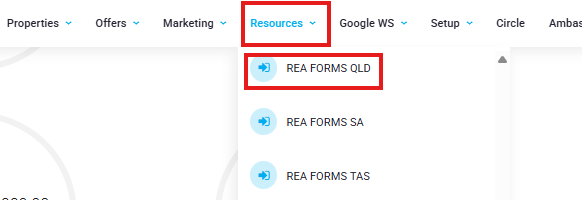
You can access REA Forms through your @realty Cloud Dashboard or you can access it through the Resources tab in the Cloud:
REA forms button on dashboard:

REA forms link in Resources tab
Where to find the template Management & Tenancy Agreements/Forms
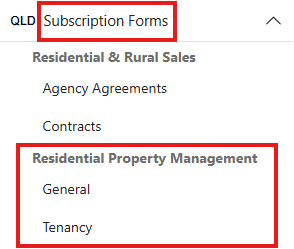
Once you have logged into REA forms, please click 'Subscription Forms' on the left hand side of the screen.
Under 'Residential Property Management: General' you can find documents pertaining to management.
Under 'Residential Property Management: Tenancy' you can find documents pertaining to the tenancy.
Was this article helpful?
That’s Great!
Thank you for your feedback
Sorry! We couldn't be helpful
Thank you for your feedback
Feedback sent
We appreciate your effort and will try to fix the article